
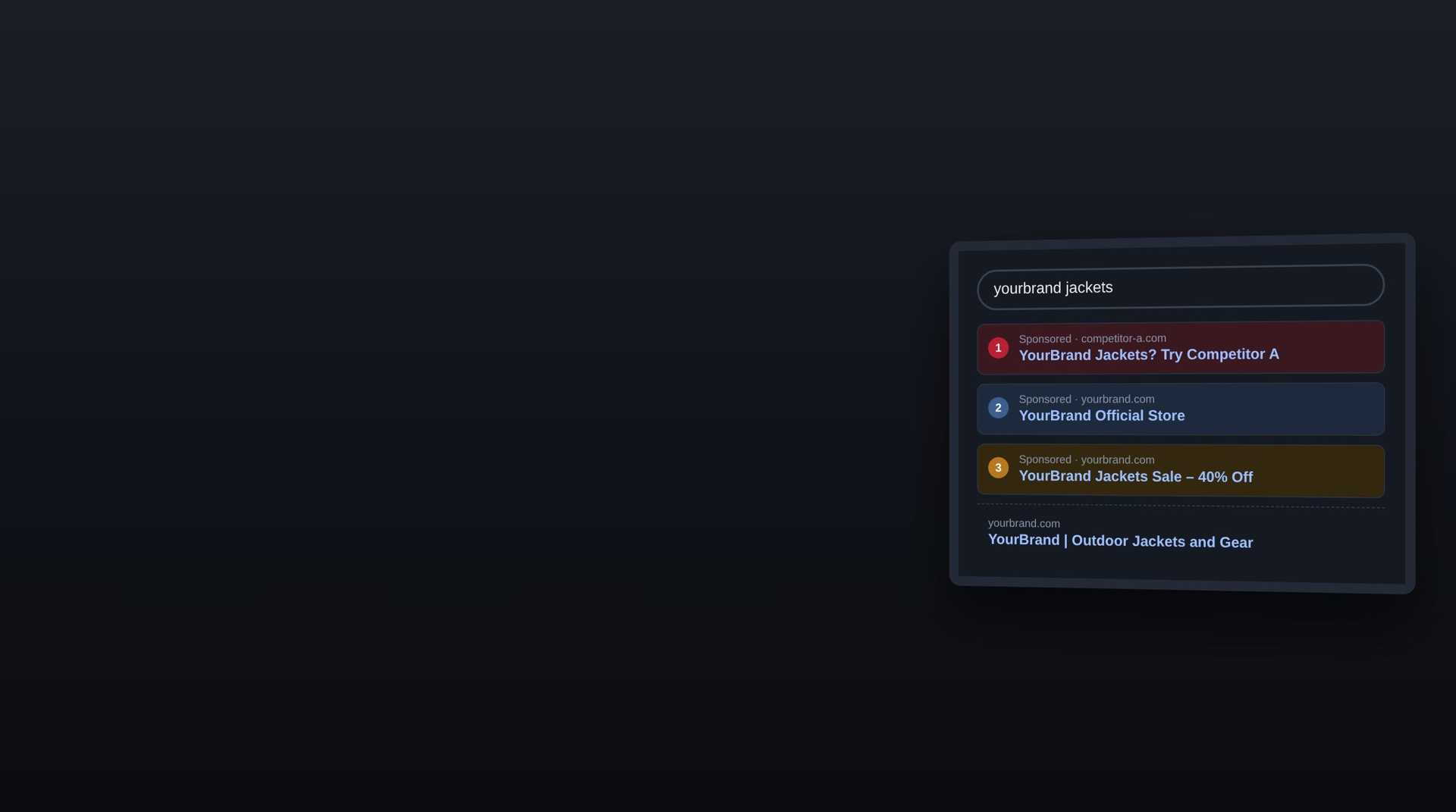
PPC Brand Protection Services: See Who Bids on Your Brand
Xwiz checks the paid search results for your brand terms on Google and Microsoft Bing, city by city, on desktop and mobile, at every hour you choose. You see every competitor, affiliate and reseller bidding on your name, the ad text they run and where they appear, with dated screenshots your team can act on.
Get a Free PPC Brand Protection SamplePPC Brand Protection: Know Every Advertiser on Your Brand Name
Someone who searches for your brand name already wants to buy from you. When a competitor, an affiliate or a reseller buys an ad on that search, one of two things happens: you lose the sale, or you pay for a click you would have earned for free. PPC brand protection is the job of finding those ads, proving them and getting them removed.
Xwiz does the finding and the proving. We run your brand terms through Google and Microsoft Bing on a schedule, from the cities and devices your customers use, and record every ad that appears with a dated screenshot. Your PPC team, affiliate manager or legal partner uses that record to act. For counterfeit listings and unauthorised sellers on marketplaces, see our brand protection services.
Competitor bidding
Rivals buying your brand name to put their offer above yours.
Affiliate brand bidding
Partners bidding on your terms against your programme rules.
Trademark in ad text
Your brand name used in someone else’s headline or description.
Shopping ads
Resellers and copycats showing your products in Shopping ads.
Brand Bidding Protection Starts With the Results Your Customers See
Checking your own brand name from the office tells you very little. Google and Bing personalise results, ads rotate through the day, budgets run out in the evening and an ad that thousands of people see in Dallas may never show in New York. Brand bidding protection only works when the checks match how real customers search: from their cities, on their devices and at the hours they buy.
Same warmth, half the price. Free returns on every order.
Shop the full range direct. Free delivery over $75.
Deals updated daily. Limited stock.
Ad link routes through an affiliate networkOfficial site. Shop jackets, fleeces and boots…
Sample search result. Brand and advertiser names are fictional.
Competitor A uses your brand name in its headline
Trademark use in ad text is the easiest case to get removed.
Your own ad sits second
You are paying to win a search you should own.
Affiliate B shows your domain
The ad looks like yours but sends traffic through an affiliate link.
What we record from every ad
Paid Search Brand Protection Report: Who Bids on Your Name
After a month of checks, the picture is usually clear. A small number of advertisers account for most of the ads on your brand terms, and each one needs a different response. This is what a paid search brand protection report looks like for a mid-sized retail brand checking three brand terms in six cities.
Swipe the table to see all columns →
| Advertiser | Type | Seen in % of searches | Average position | Above your ad | Your brand in ad text | First seen |
|---|---|---|---|---|---|---|
| Competitor A | Competitor | 38% | 1.4 | 61% | Yes | 3 Nov |
| Affiliate B | Affiliate | 22% | 2.1 | 18% | Yes | 12 Nov |
| Coupon site C | Coupon site | 15% | 3.0 | 0% | No | 28 Oct |
| Reseller D | Reseller | 9% | 2.6 | 7% | Yes | 19 Nov |
| Competitor E | Competitor | 4% | 3.4 | 0% | No | 22 Nov |
Sample data. Advertisers and figures are fictional.
Google Ads Brand Protection by City and Hour
Most brand bidding is not constant. Competitors schedule their ads for the hours and places where your own brand campaign is weakest, often in the evening once your daily budget has run out. Google Ads brand protection has to cover those hours too, or the report will say all is well while you lose the busiest shopping time of the day.
Evening gaps
When your daily budget runs out, rivals take position one. The report shows exactly when it happens.
City by city
Rivals often target only the cities where they have stores or cheaper delivery.
Mobile and desktop
Mobile results show fewer ads, so losing the top spot there costs more.
Sample data. Figures are fictional.
Someone is probably bidding on your brand tonight. Find out who.
Send us your brand terms and the cities you sell in. We’ll run a week of checks across desktop and mobile and send you every advertiser we find, with screenshots, positions and the hours they appear.
Get a Free PPC Brand Protection Sample Public search results only · We never click ads · NDA on request- Position3 (above organic)
- First seen12 Nov, 19:40
- Seen since41 searches
Sample data. Names and figures are fictional.
Six Kinds of Brand Bidding, and What to Do About Each
Not every ad on your brand name is a problem, and not every problem needs a lawyer. Good advertising brand protection sorts what we find into clear groups, so each one goes to the right person with the evidence they need.
Competitor conquesting
A rival bids on your brand name to place its own offer above yours.
Affiliate brand bidding
A partner bids on your brand terms, often against your programme rules, and claims commission on your own customers.
Trademark in ad text
Your brand name appears in another advertiser’s headline, description or display path.
Coupon and deal sites
Voucher sites bid on “your brand + discount code” searches and take a cut of sales you would make anyway.
Shopping ads from resellers
Unauthorised sellers show your products in Shopping ads, often below your price.
Misspellings and variants
Advertisers bid on common misspellings and “brand + product” terms you do not watch yourself.
Resellers who undercut your price in Shopping ads are often the same sellers who break pricing rules on marketplaces. Our MAP monitoring tracks their prices, and our marketplace intelligence shows where else they sell.
Brand Keyword Protection Evidence Your Team Can Act On
A complaint is only as strong as its evidence. Every ad we flag comes with a case record that shows what appeared, where, when and to whom, so your team never has to argue from a memory of something they saw once. Brand keyword protection records are kept for as long as you need them, which matters when the same advertiser comes back three months later.
We do not file complaints or contact advertisers for you. Your PPC team, affiliate manager or legal partner decides what to do; we make sure they have the proof. For the wider picture of how brands handle misuse online, read what brand protection is and the strategies that work.
PPC team or agency
Raises bids, adjusts schedules and contacts rivals.
Affiliate manager
Enforces programme terms and claws back commission.
Legal or brand team
Files trademark complaints with Google and Microsoft.
Deals updated daily. Limited stock.
- Search term
- yourbrand jackets
- Location and device
- Dallas, TX · mobile
- Date and time
- 12 Nov 2026, 19:40 CST
- Advertiser as shown
- Affiliate B
- Position
- 3 of 3 ads
- Display URL
- yourbrand.com
- Landing domain
- tracking.partner-network.example
Sample record. Names, domains and figures are fictional.
See who sits on your brand terms this week
A free sample covers your main brand terms, the cities you choose and both desktop and mobile results.
Who Uses Our PPC Brand Protection
Advertising brand protection affects several teams at once, and each one needs a different cut of the same data. We set up the checks around the brand terms, cities and advertisers that matter to each of them.
In-house PPC teams
Stop paying more per click on your own name, and know exactly when to raise bids or extend your schedule.
What they trackAffiliate and partner managers
Catch partners who bid on your brand against programme rules, with proof the network will accept.
What they trackSearch and performance agencies
Show clients a monthly record of who bids on their brand, and add search ads brand protection to your service.
What they trackLegal and brand protection teams
Get dated, location-specific evidence for trademark complaints and letters, without manual searching.
What they trackFranchise and multi-location brands
See which franchisees, local rivals or lead sellers bid on your name city by city.
What they trackEcommerce and DTC brands
Find resellers and copycats in Shopping ads, and see where they undercut your price.
What they trackSearch Engines, Locations and Brand Terms We Check
Brand protection PPC checks need to cover more than one search engine and more than one spelling. We check the engines and ad formats your customers see, for the exact terms they type, from the places they search.
Search engines
Paid results on Google and Bing, so Microsoft Ads brand protection is covered too.
Shopping ads
Seller, product, price and position.
Brand terms
We suggest variants from what customers really type.
Locations
Checked from the places your customers search.
Devices and times
So evening and weekend bidding shows up.
Markets
In the local language and currency.
Public search results only, and no ad clicks. We record ads exactly as any searcher sees them. We never click competitor ads, so we never cost an advertiser money, and we never collect personal data.
Google, Microsoft Bing and other names are trademarks of their owners. Xwiz is not affiliated with or endorsed by these companies.
Brand Bidding Alerts and Reports on Your Schedule
Set how often each brand term is checked and how you want to hear about new advertisers. Urgent finds, like your brand name in a rival’s headline, can go straight to email. Everything else arrives as a brand protection PPC report: a clean dataset your team can filter, chart or send to a client.
How often we check
Your main brand terms in your top cities, including evenings.
Secondary terms, misspellings and smaller markets.
Shopping ads and full summary reports.
Trend reports for leadership and clients.
Formats and delivery
Full history kept. Every ad and screenshot is stored, so you can show when an advertiser started, stopped and came back.
{
  "checked_at": "2026-11-12T19:40:00-06:00",
  "engine": "Google",
  "search_term": "yourbrand jackets",
  "location": "Dallas, TX",
  "device": "mobile",
  "ad_position": 3,
  "ads_on_page": 3,
  "advertiser": "Affiliate B",
  "advertiser_type": "Affiliate",
  "headline": "YourBrand Jackets Sale – Up to 40% Off",
  "display_url": "yourbrand.com",
  "landing_domain": "tracking.partner-network.example",
  "brand_in_ad_text": true,
  "above_your_ad": false,
  "your_ad_position": 2,
  "screenshot": "ppc-2026-0412-1940.png",
  "first_seen": "2026-11-12",
  "times_seen": 41
}
Sample data. Names and domains are fictional.
How PPC Brand Protection Works
From your first message to your first alert, our PPC brand protection team handles the setup. You tell us what to protect; we build, run and maintain the checks, and review every flagged ad before it reaches you.
- 1
Share your brand terms
Send your brand names, product lines, known rivals and the cities and countries you sell in.
- 2
Check a free sample
We run a week of checks and send every advertiser found, with screenshots and positions.
- 3
Set alerts and reports
Choose check frequency, who gets urgent alerts and how reports are delivered.
- 4
Go live, fully managed
Checks run on schedule. When search pages change, we fix the collection.
- 5
Add terms and markets
Add new products, misspellings or countries at any time, with the same history.
How to Choose the Best PPC Brand Protection Service
Brand bidding tools can look alike in a demo. The differences show up when a complaint is rejected for weak evidence, or when a rival turns out to bid only after 6 pm in two cities you never checked. Ask every provider these questions, including us.
Real locations
Ads change from city to city.
Mobile and desktop
Mobile shows fewer, more valuable ads.
Evenings and weekends
Rivals bid when your budget runs out.
Evidence that holds up
Complaints need proof.
More than your exact name
Customers misspell brands.
No ad clicks
Clicking rival ads costs them money and proves nothing.
Clear next steps
Findings should go to the right team.
The best choice depends on how many brand terms and markets you need covered and who acts on the results. A self-serve tool can work for one brand in one country. If you need city-level checks, evening coverage and evidence your legal team can use, a managed PPC brand protection service like ours is usually the better fit.
PPC Brand Protection FAQs
Straight answers on PPC brand protection: what we monitor, Google and Bing coverage, affiliate brand bidding, evidence for trademark complaints, check frequency, ad clicks and how to get a free sample.
PPC brand protection is the regular monitoring of paid search ads on your brand terms to find competitors, affiliates, coupon sites and resellers bidding on your name. Xwiz checks Google and Microsoft Bing results from the cities and devices your customers use and records every ad with a dated screenshot, so your team can act.
In many markets, bidding on a competitor’s brand name as a keyword is allowed, but using a registered trademark in the ad text usually is not. Google and Microsoft both accept trademark complaints about ad text. We give you the evidence; for advice on your specific case, speak to your own legal counsel.
We record every ad on your brand terms, including ads that show your own domain but route through an affiliate or partner network. Each record includes the time, location, device, ad text and display URL, which is the proof most affiliate networks ask for before they act on a breach of programme terms.
We cover Google Search ads, Microsoft Bing ads, which also appear on Yahoo and DuckDuckGo, and Shopping ads on brand searches. Checks run for your brand name, common misspellings, brand plus product terms and brand plus discount code searches, in the countries, cities and devices you choose.
Your own searches are personalised, often hide ads you have already seen and only show one city and one moment. Many rivals bid only in certain cities or after your daily budget runs out in the evening. Scheduled checks from real locations show what customers actually see.
No. We record ads exactly as they appear and never click them, so we never cost an advertiser money or create invalid clicks. We only collect public search results and never collect personal data.
You choose the schedule. Main brand terms in your top cities can be checked every hour, including evenings and weekends, while misspellings and smaller markets are usually checked several times a day. Urgent finds, like your brand name in a rival’s headline, can be sent as email alerts.
Send us your brand terms, product lines, known competitors and the cities and countries you sell in. We’ll run a free week of checks across desktop and mobile and send every advertiser we find, then agree your schedule, alerts and reports once you approve.
Send us the routes, travel dates, cabins, competitors and sales channels you want to track. We’ll send a free sample of real fares so you can check accuracy and format, then agree your schedule, alerts and delivery format and start regular deliveries once you approve.
Blog & Articles
Get a Free PPC Brand Protection Sample
Tell us your brand terms, known competitors and the cities and countries you sell in. Our team will review your request and send a plan with a free week of brand bidding checks.